AnKing-aware lookup
Search for existing AnKingOverhaul notes by configurable UWorld or AMBOSS QID templates before adding a new note.
Reviewed Anki card creation for med school
AnkiPilot opens beside your study page, uses the context you choose, drafts focused AnKing cloze or Basic cards, and lets you approve each card before it enters Anki.
The bottleneck
AnkiPilot is built for that moment after review: capture the takeaway, shape it into an Anki note, and keep moving.
Beside the explanation
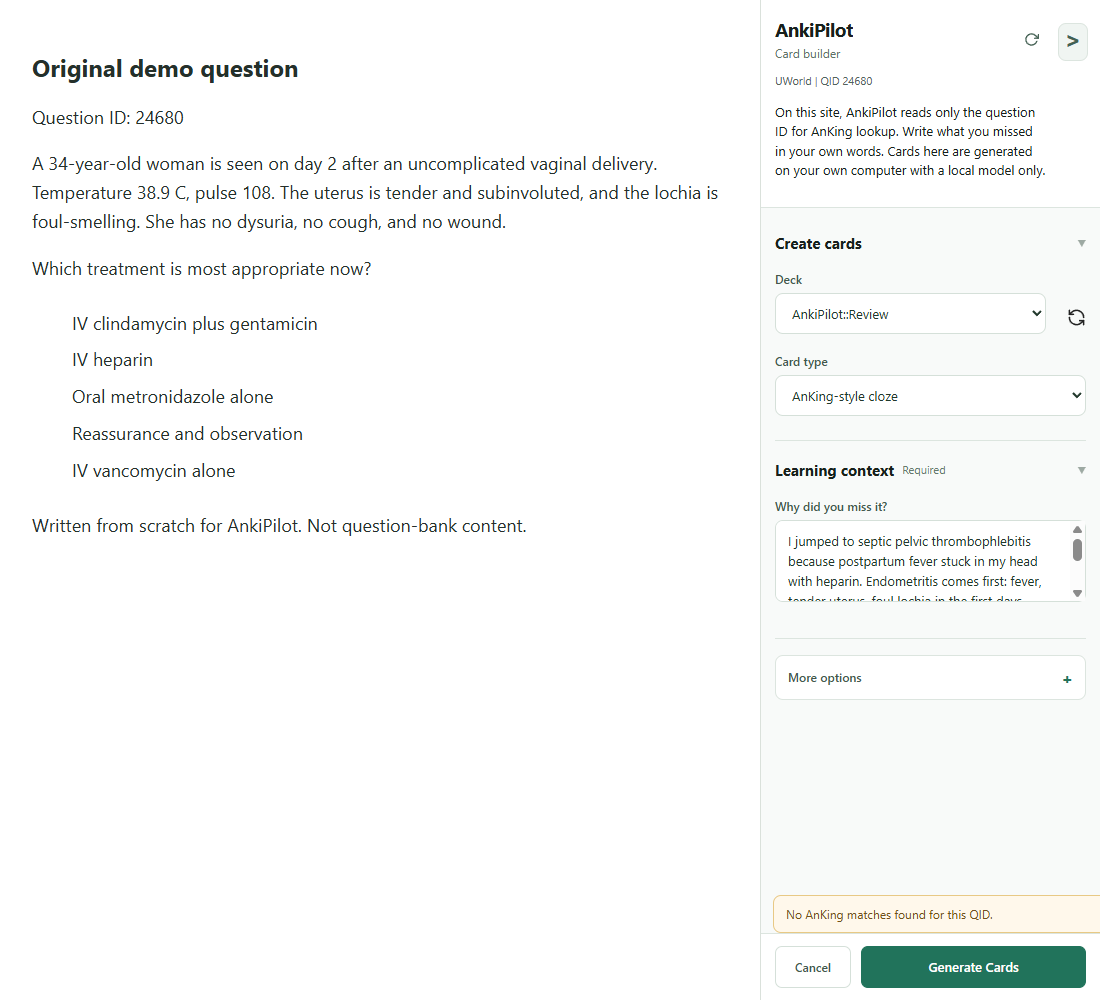
The side panel stays open while you review your study notes, refine wording, choose the note type, and confirm the final card before adding it to Anki.
Built for med-school review
AnkiPilot is tuned for medical students using Anki, AnKing, UWorld, and AMBOSS, while the selected-text workflow still works for dense articles, lecture notes, and other subjects.
Search for existing AnKingOverhaul notes by configurable UWorld or AMBOSS QID templates before adding a new note.
On ordinary pages, pair selected text with your own note about why you missed it. On UWorld and AMBOSS pages, the context is the question ID plus that typed note, and nothing else from the page, so the card targets the key distinction.
Send approved cards to the configured deck, note type, fields, and tags instead of rebuilding the card manually.
Review standards
AnkiPilot checks card structure before Anki sync: clear prompts, useful hints, safe formatting, clean field mapping, and questions that do not reveal their own answers.
Clozes are guided toward useful retrieval hints such as mechanism, risk factor, diagnostic clue, or next management step.
Front fields are checked for answer leakage, Back fields stay direct, and Notes hold the reasoning or key distinction.
You see the generated fields, tags, source context, and optional screenshot before anything is added to your deck.
More than a prompt
Good card creation needs source capture, review, field mapping, deck routing, tags, optional screenshots, and a final AnkiConnect action. AnkiPilot keeps those steps in one flow.
Start from selected text on ordinary pages, or type your own missed-concept note on question-bank pages.
Use card fields, tags, note type, and deck defaults from the beginning of the workflow.
Check for related AnKing notes by question ID before deciding whether a new card is needed.
On ordinary pages, preview optional screenshots and store them through Anki media for personal review.
Questions before trying it
AnkiPilot is a Chrome extension. Install it from the Chrome Web Store and follow the setup guide. AnkiPilot is free, has no accounts, and needs no sign-in.
No. AnkiPilot creates reviewed notes through AnkiConnect. Anki remains your deck, scheduler, and review system.
No. You review, edit, approve, or skip generated cards before anything enters your Anki profile.
On UWorld and AMBOSS pages, AnkiPilot reads only the question ID and uses it to find matching AnKing notes in your own collection. You type what you missed in your own words, and cards on those pages are generated with a local model on your own computer. You are responsible for following the terms of every resource you study from.
Yes. AnkiPilot works with your own OpenAI, Anthropic, or Google key, and your browser calls the provider directly. You can also send generation requests to Ollama on your own computer.
AnkiPilot is free and has no paid plans. If you use your own API key, your provider bills your account under its own rates. Local generation has no provider API charge; hardware and electricity costs still apply.
Ready for launch
AnkiPilot is free. Use your own API key, or run a local model on your own computer.
One email when a new version ships or testers are needed. No marketing list, and your address is never shared.
You're on the list.
Prefer a full page? Open the signup form on its own page.